8 Trigonometric Correction / Length Unit
Note
In the factory setting, the length unit is set to "m". It can be changed to "ft" (feet).
Note
In the factory setting, the trigonometric correction is activated.
If the ELEVATION module cannot swing freely (e.g. due to cable tension), the trigonometric correction can correct the deviation.
If the trigonometric correction is activated, a deviation from the vertical is corrected. The corrected value appears on the display. If it is deactivated, the actually measured – and possibly incorrect – value of the oblique measurement is displayed
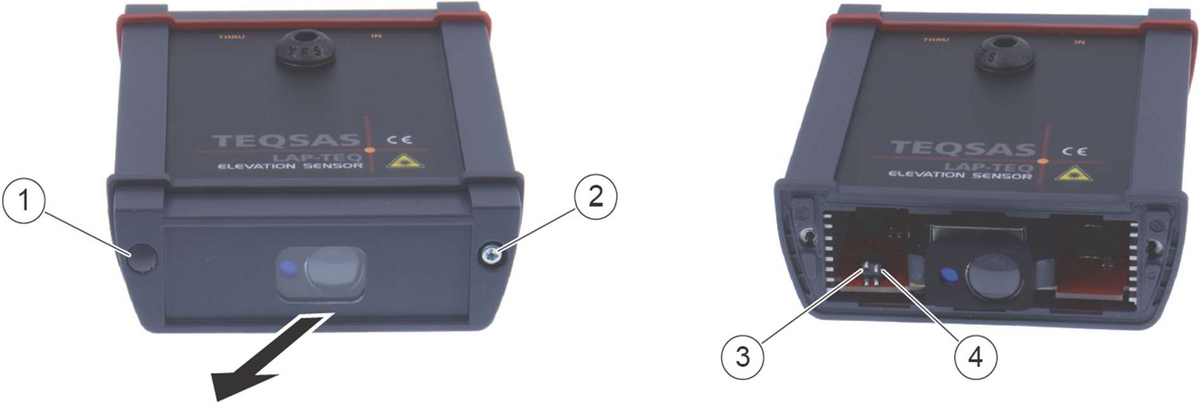
- Remove both cover caps (1) on the display module using a small screwdriver
- Unscrew both screws (2)
- Pull off the cover
- Set the DIP switches (3) and (4)
- Set the length unit to metres or feet – DIP switch 1, left (3):
- Metres: set DIP switch 1 to "OFF"
- Feet: set DIP switch 1 to "ON"
- Activate/deactivate trigonometric correction – DIP switch 2, right (4):
- Activate trigonometric correction: set DIP switch 2 to "ON"
- Deactivate trigonometric correction: set DIP switch 2 to "OFF"
- Replace the cover
- Tighten both screws (2)
- Press both cover caps (1) back on